|
|
Posted By Christine Valentine, Concordia University of Edmonton,
Tuesday, July 15, 2025
Updated: Monday, July 14, 2025
|
A practical addition to your policy programAs a policy administrator, few accomplishments are more meaningful than helping a colleague navigate a complex policy project. One of the most fulfilling aspects of my role as Policy & Records Analyst is providing guidance and support, especially when policy development and review feel unfamiliar or overwhelming.
At Concordia University of Edmonton (CUE), a small university in Edmonton, Alberta, known for its strong sense of community, that supportive spirit extends to our policy work. Our approach emphasizes collaboration, clarity, and long-term sustainability, ensuring that institutional policies remain aligned with the university’s vision, mission, and strategic objectives.
When I joined CUE, my aim was to establish a consistent, university-wide process for developing and reviewing policies. Early on, I recognized that building an effective policy program involves more than setting rules or monitoring compliance. It requires meaningful engagement with the people who contribute to the work. At CUE, policy development is a shared responsibility. Developers come from across the institution, bringing diverse expertise and varying levels of experience in policy writing. To support their success, I created the Policy Developers’ Toolkit—a user-focused resource designed to empower policy developers to engage confidently and effectively in the policy development and review process. Why we created the toolkitCUE’s five-step policy development and review process is designed to be straightforward, consistent across all policy instrument types, and easy to follow:
- A new policy action (creating a new policy or revising or rescinding an existing one) is proposed through a Policy Document Action Plan.
- Upon endorsement, the policy owner assigns a policy developer or development team.
- The development phase includes benchmarking, drafting, and consultation.
- The policy is submitted to the Policy Review Committee for review.
- Final approval is sought from the appropriate institutional authority.
Although the process itself is simple on paper, Step 3—development and revision by the policy developer—is often the most challenging. Policy developers are typically subject-matter experts, but they may not be familiar with translating their expertise into policy language that is clear, concise , and helpful.
As I worked alongside developers, I realized that providing one-on-one support for each project would not be sustainable long-term. I began by sharing checklists and other key reference documents, but it soon became clear that we needed a more comprehensive, centralized resource. The goal was twofold: to build confidence and understanding among our developers and to enable me, as the policy administrator, to manage multiple projects efficiently while still offering meaningful support.
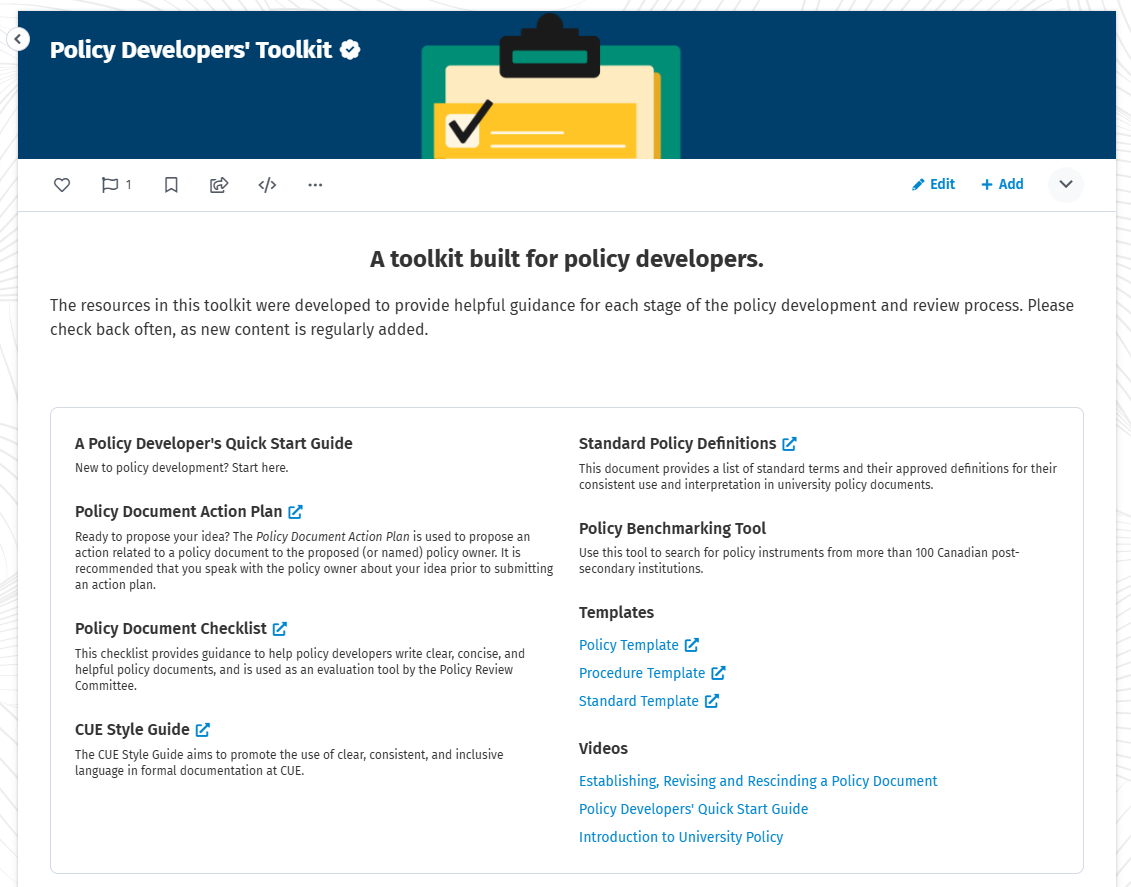
Bringing these resources together in a central repository also allowed me to understand how they worked together and identify any gaps. This insight allowed me to refine the tools, build coherence, and ensure the approach remained practical and user-friendly. What’s in the toolkit?The Policy Developers’ Toolkit is hosted in CUE Connect, our employee intranet. It is organized around the key stages of the policy development and review cycle, and is designed to meet developers where they are—whether they are new to policy work or more experienced.
Current resources include: - Policy Document Checklist – used by both policy developers and the Policy Review Committee to ensure policies are clear, concise, and helpful.
- Templates – standardized, fillable templates for various policy instruments.
- Standard Policy Definitions – to support clarity and consistency across all documents.
- Policy Benchmarking Tool – a custom Google search engine that scans 100+ Canadian post-secondary policy sites based on a keyword search.
- Instructional Videos – short walkthroughs, including a Quick Start Guide for new developers.
- Links to Key Resources – including our policy repository and essential documents like the Policy Document Action Plan.
Building Your Own ToolkitIf your institution does not yet have a policy development toolkit, or you are in the process of building one, here are a few steps I recommend:
- Find a Home for Your Toolkit: Use a central, easily accessible location such as an employee intranet.
- Start with What You Have: Gather existing resources like templates, checklists, and process guides.
- Communicate Often: Link to the toolkit in training materials, auto-replies, and communications with policy developers.
- Invite Feedback: Engage your users to learn what is working and what could be improved.
- Review and Improve: A good toolkit should evolve with your policy program. Make updates a regular part of your work.
When we launched our toolkit, it coincided with significant revisions to our Policy on University Policy Documents. This timing allowed the toolkit to support implementation and promote a smoother transition. A well-timed, accessible toolkit can be a powerful aid in navigating institutional change. Final Thoughts: Policy as a Community EffortTo me, policy work is one of the ways we express care for our institution and for one another. The Policy Developers’ Toolkit reflects that care by prioritizing clear guidance and accessible support to help our colleagues navigate what can sometimes feel like a complex process. While it is a practical tool, I also see it as a statement: policy work matters, and the people doing it deserve the right support to do it well.
Over time, consistent communication helped embed the toolkit into CUE’s institutional culture. It has become a staple in our policy trainings, a standard reference in policy-related email communications, and a key component of our broader efforts to promote policy literacy. Housed within our centralized hub for policy information, the toolkit makes it easy for employees to find the right resources at the right time.
As the toolkit becomes further integrated into our policy infrastructure, we continue to expand its scope. Planned additions include interactive training modules and workshops designed to build engagement and deepen institutional capacity in policy development. In this way, the toolkit is not a static product, but a growing and evolving support system that reflects our commitment to a thoughtful, community-centered approach. 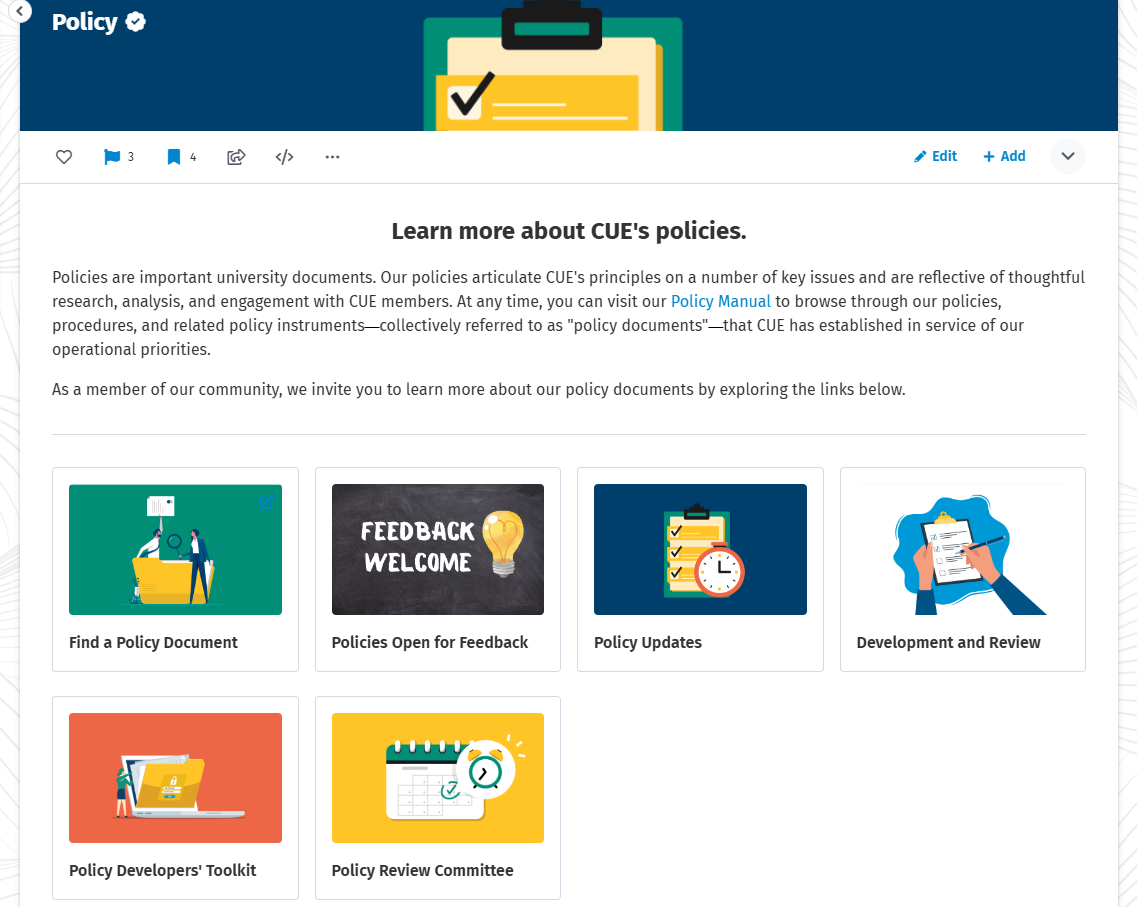
As policy administrators, we know that policy work is both foundational and deeply human. While our documents provide structure, it is the people who shape them. The support they receive plays a vital role in ensuring policies reflect our institutional values and serve our communities well. By investing in the individuals who create and revise our policies, we help foster a culture of collaboration, inclusion, and shared purpose.
-
If you have tools or strategies that have proven helpful in your own policy toolkit, or if you are currently building one for your institution, I warmly invite you to share your insights and experiences. Please feel free to leave a comment or reach out to me at christine.valentine@concordia.ab.ca. I look forward to connecting and learning from your journey.
Attached Thumbnails:
Tags:
Christine Valentine
policy development
policy writer
resources
toolkit
Permalink
| Comments (0)
|
|
|
Posted By Sara Gigeroff, University of New Brunswick,
Monday, July 10, 2023
Updated: Sunday, July 9, 2023
|
A Compilation of Contributions
ACUPA’s Blog Committee would like to take this opportunity to reintroduce members to our blog, Policy Matters
! Policy Matters launched in 2018 taking the place of ACUPAexchange
, a triannual newsletter publication. The original purpose of the blog was to address the needs of our members and maximize the efficiency of our processes. To highlight the efforts of current and past Blog Committee members, as well as volunteer
contributors, all posts published since the inception of the blog have been organized alphabetically into categories based on theme and are linked below for easy access.
ACUPA (General)
ACUPA Blog Committee Welcomes Policy Experts
ACUPA Website Features
Welcome to the New Blog!
Accessibility
Are Your Policies Accessible? Part 1: An Introduction to Web Accessibility
Are Your Policies Accessible? Part 2: Common Mistakes and How to Avoid Them
Are Your Policies Accessible? Part 3: Automating Accessibility in Custom Word Templates
Are Your Policies Fully Available to Your Stakeholders?
Hybrid/Remote Work
Adapt to an Online Environment to Develop Policies
And Now We Zoom...
Hybrid Work Schedules
Pivot to a Remote Work Environment
Pandemic and Policy
A Sea of Change and a Pandemic
Campus Changes in Light of the Coronavirus
Moving toward a New Normal
Policy Changes on Steroids and I'm Over It
Policy Matters Open Forum Covid
To Vax, or not to Vax
Policy in the News
Policy in the News (2023)
Policy in the News (2022)
Policy in the News (2021)
Policy in the News (2020)
Policy in the News (2019)
The Policy Process
Always Getting Better
Benchmarking Policies
Choose Your Words Carefully
Do I Really Need a Policy and Procedure?
Do You Cite References in Policy?
Do you evaluate your policy objectives?
Expediting Policies to Address Organizational Risks
Inclusive Policy Development
Increase Awareness of and Participation in Policy Development
Let's Talk About Procedures!
Organizing a Policy Catalog
Our Language Matters
Policies as More than Rules
Policy Development – Are Templates Required?
Policies Requiring Public Review and Comment
Project Management
The First Element
What Is a Policy?
When Your Steering Committee Fails to Steer
Where Does Your Policy Function Belong?
Where have all the Policies Gone? Part I
Where have all the Policies Gone? Part II
Roles and Responsibilities of Policy Professionals
Beyond the Policy Administrators Role
Defining Career Success
Other Duties as Assigned
So, What Do You Do?
What it Takes to be an Effective Policy Administrator
What’s In Your Policy Closet?
Software, Programs, and Digitization
Behind the Scenes of Policy Data
Customize Your Microsoft Word Experience (I)
Customize Your Microsoft Word Experience (II)
Easily Convert Web Pages to PDF Format
In Search of Innovation
Policy Administration for the Digital Age
Version Control, Auto Saving, and Collaborative Editing
Title IX
Historical View of Title IX
Title IX Officers are the People Who Stay Awake at Night
Miscellaneous
Bereavement Leave
Betting on College Sports
Equity Review at Georgia Gwinnett College
Is Technology Dictating Policy?
Is Your Institution Ready for the Robot Invasion?
Learning and Love
"Operation Varsity Blues": High Stakes Testing in College Admissions
Policy and Political Activism
Protecting Essential Records -- Key to Surviving a Catastrophe
Reducing Risks to Institutional Data
Student Interns as Valued Employees
The Joining of Two Community Colleges
The Power of P3s
The Robots are Coming
The Violence of the Last Six Months
Thoughts on Retirement
Values in Action
As was stated in the inaugural blog post, we continue to appeal to you, our members, to help us evolve and decide whether the information shared in the featured posts are relevant and interesting. Do you have an idea for a blog post? Ultimately, this blog is for you, our members, and your submissions are encouraged and welcomed! If you are interested in contributing as a guest (maybe you are interested in being interviewed to share your own experiences as a policy professional), becoming a member of the Blog Committee, or want to share an idea for a topic to be explored through a post, please do not hesitate to contact us.
Tags:
accessibility
ACUPA
Data
developing policies
diversity
equity
guidelines
Hybrid
Microsoft
News
Pandemic
PDF
policies
policies and procedures
policy
policy design
policy development
policy/procedures
Programs
Remote
resources
Responsibilities
Roles
Sara Gigeroff
Software
Word
Permalink
| Comments (0)
|
|
|
Posted By Deborah Bartlett, Washington State University,
Monday, June 12, 2023
Updated: Friday, June 9, 2023
|
Making Your Policies Accessible to All Audiences
Most institutions are now aware of the need for recognizing and respecting the differences among the members of our stakeholder communities. As policy administrators, many of us are building
equity review into our policy development processes.
Most of us now publish our institutions' policies online and share our policy drafts electronically, rather than in paper policy manuals or through paper documents. Just as it's important
to consider adding equity review to the development of policies, it's also important that we consider how to prepare the content for distribution in ways that make it accessible to a wide range of people, including those who use assistive devices.
Here are some considerations for your institutions, all of which we’ve put in place here at Washington State University (WSU): - Establish a policy and/or procedures for improving the accessibility of online and electronic content. As
an example, here at WSU we have an executive policy and supporting procedures:
- Require web accessibility training for all institutional
online developers and webmasters.
- Provide issue reporting and complaint/grievance procedures regarding accessibility issues.
At WSU, our Web Communications unit handles web accessibility problems and our institution's ADA (Americans with
Disabilities Act) coordinator is responsible for managing access complaints and grievances.
Creating Accessible Word and PDF Documents
Most of us use Word to create our source documents and either Word or PDF for drafts and creating
web versions of our policies. Taking in consideration of assistive devices, here's some key components for making Word and PDF documents accessible to all: - Headings:
- Headings create a hierarchy in the document that a screen reader
can follow.
- Document Title, Description, and Tags:
- A default document title is necessary for a screen reader to be able to scan and read out loud to its user.
- A document description gives screen reader users a brief summary of the
document they are about to read.
- Document tags allow a screen reader to know if they are looking at an image, a paragraph, a heading, etc.
- Hyperlinks:
- Hyperlinks need to have clearly defined labels of the destination of each link
so that a screen reader is able to read them out loud when scanning the document.
- It's preferable to embed link URLs (attach the URL in the background to a word or phrase using the Link function), also known as contextual links, rather than writing
out URLs in the document.
- Tables:
- Clear table structures and headers are necessary for a screen reader to be able to scan the document.
- Alt Text:
- Alt Text data allows a screen reader to scan a description of tables, figures,
or images that may be on the document.
- Lists:
- The built in formatting tools of Word make it easier for the screen reader to scan the document.
- Capitalized Words:
- Use bold for emphasis and avoiding capitalization of words.
- Assistive devices may provide capitalized words to users by reading each individual letter, instead of complete words.
- Tab/Reading Order
- For PDFs, identifying the reading order of a document’s text helps a screen reader present the text
as it is meant to be read, rather than just as random blocks of text.
Creating Fully Functional PDFs from Word
With the latest versions of Word in Office365, all accessibility functionality in a Word source document may be directly
transferred to a PDF version: - Select File->Save As
- Change the file type (suffix) from the default Word Document (.docx) to PDF (.pdf).
A PDF file created in this way includes all of your active hyperlinks and other functionality.
Creating Accessible Documents from Scanned Images
In order to make scanned document images accessible to a screen reader user, a few things need to be done, otherwise none of the information on the document can be read by a screen reader: - Make or convert the scanned image to PDF
- Under Tools (in Adobe Acrobat Pro):
- Select Optical Character Recognition (OCR)
- Select Text Recognition and In This File, and
- Select the pages to be included
- Under Tools:
- Select Action Wizard, then
- Select Make Accessible
- Select Find Recognize Text Using OCR
- In the Recognize Text -- General Settings window:
- Select the applicable language and
- Select Searchable as the PDF Output Style
- Select OK
Accessibility Guides
The process of increasing equity in our policies and policy access is ongoing. Here are some accessibility guides to provide you with further ideas as you get started:
Tags:
access
accessibility
accessible documents
ACUPA
assistive devices
Deborah Bartlett
developing policies
equity
guidelines
PDF
policies
policies and procedures
policy
policy design
policy development
policy/procedures
recommendations
resources
Word
Permalink
| Comments (0)
|
|
|
Posted By Sara Gigeroff, University of New Brunswick,
Monday, February 13, 2023
Updated: Tuesday, February 14, 2023
|
Rearranging Priorities When You Have “Too Many Hats”
The Potential For Cluttered Closets
I often comment that policy professionals are a unique group of people.
Our coworkers don’t completely understand our passion for policy, let alone the timelines associated with the policy process. They are aware of some of our skills, but not necessarily the many hats we wear behind the scenes due to the amount of autonomy
we have in our positions. Despite juggling additional tasks along with our established responsibilities, many of us would enthusiastically affirm that we chose policy as a career path due to the meaningful change we see across the academy based on
the work we are involved in.
That said, our passion for creating positive change can make it difficult for us to decline opportunities to employ our niche skills when we are requested elsewhere across the institution. Before we know it, our policy closet is filled with hats of all
sorts. It looks like we’ve hit a big sale, except . . . we already had a favorite hat, maybe a few lost in the back of our closet, and we didn’t get rid of any old hats to make room for the new ones. An overflowing closet can become overwhelming,
but sorting through it and establishing boundaries can help us maintain that peculiar passion for all things policy while keeping our closets organized.
New Hats Can Be Fun, But A Messy Closet Is Overwhelming
The bulk of policy work is work we do independently and behind the scenes, which can result in numerous requests for our information analysis skills, our keen eye for detail, and our comprehensive planning strategies.
In my case, as an employee dedicated to a research office, it can involve assisting an agreements group, advising on community partnerships, navigating culturally appropriate methods of conducting research, sitting on ad hoc committees, and assisting
with strategic plan development, all while prioritizing my everyday policy-related needs. Being involved in these additional projects is usually a nice change of pace.
Of course, the policy process can be long and lonely, so working with colleagues across campus on various initiatives and representing an office on ad-hoc committees can provide the little break we sometimes need from the frustrations of policy planning
and programming. Personally, being involved with ACUPA and lending my skills elsewhere on campus re-ignite the passion I have for policy work, but possessing the niche skills of a policy specialist can lead to big or frequent donations of hats, as
well as the gift of many new hats to our closets if we aren’t careful.
Communicating Your Closet Contents To Others
Years ago, when managing a non-profit program for individuals experiencing mental illness who found their diagnoses negatively impacted their work lives, I spent a lot of time training employees and those we supported to recognize their limits in the
workplace, to advocate for themselves, and to respectfully set boundaries with employers. Now, having returned to work in academia where my skills can be spread thin due to requests outside of my core duties, I often remind myself of the importance
of establishing boundaries at work so as to keep my policy closet tidy.
In my current position, this means having to politely decline when asked to independently draft campus-wide policies that are out of my scope, while still offering to be part of working groups and carving out time to review a draft in its entirety prior
to consultation. It also involves reminding others that I work in a policy position dedicated to the research office, and therefore, my top priority in any project is to ensure researchers, graduate students, and post-doctoral fellows are considered
and appropriately represented in policies external to our office.
Along with that, having regularly scheduled, honest conversations and check-ins with senior management is extremely important. Policy positions, job responsibilities, and priorities all expand and change over time, so re-evaluating responsibilities and
advocating for change within our positions is necessary or our closets become overwhelming.
Purging And Re-evaluating Closet Contents Is Advantageous For Everyone
Ultimately, advocating for yourself and politely setting boundaries is advantageous not only to you, the employee, but often positively impacts the office or unit you work in because you are then better able to focus on their needs and priorities rather
than getting sucked into every possible project. Having those conversations with senior management doesn’t necessarily mean you won’t be required to stretch yourself now and then to pitch in. Revealing your closet contents, reevaluating them, and
rearranging them, however, can help keep you passionate about the work you do, while providing more balance in your work life, and oftentimes, your home life, which is something most of us need more than we are willing to admit.
What’s In Your Policy Closet?
What does your policy closet look like? Is it small and stuffed to the brim? Do you have a well-organized walk-in closet? How many hats do you have? Do you have a favorite hat or a least favorite hat? Are there hats lost in the back of your closet? Tell
us in the comments below.
Note for ACUPA members: Check out the ACUPA Sample Job Descriptions webpage for examples of the numerous roles and responsibilities of policy professionals. These have
been provided by policy administrators at multiple institutions and can be valuable resources when evaluating priorities and responsibilities.
Tags:
ACUPA
job descriptions
policies
policies and procedures
policy
policy/procedures
priorities
recommendations
resources
responsibilities
samples
Sara Gigeroff
task management
time management
writing
Permalink
| Comments (0)
|
|
|
Posted By Deborah Bartlett, Washington State University,
Monday, February 14, 2022
Updated: Friday, February 11, 2022
|
Framework Recommendations Instead of Templates
In conversations and webinars with other policy administrators, the debate about whether or not to use templates for writing and developing policies continually comes up. A number of institutions mandate the use of one or more templates for their users who want to develop policy and/or procedures documents.
I've worked for the past 25 years in the administrative policies office for Washington State University. We've chosen not to use a template for developing the administrative policies and/or procedures our office publishes. We do have a style guide, but it’s mostly involved with formatting and layout so that sections and policies have a uniform “look.” Our choice has predominantly been based on the idea of providing flexibility to our subject expert departments as they update or add new sections to our long-established administrative policy manuals. In accordance with WSU's executive Policy on Policies (EP5), departments may begin development of their administrative policy/procedure rough drafts prior to bringing my office into the process or may request our assistance with developing the drafts from the beginning. As subject expert administrators get started, we do occasionally get requests for policy framework guidance from those who are new to policy writing and development. Here’s a general outline that my office recommends for writing a new policy or policy/procedure section for placement in one of our administrative manuals: - Overview and/or Policy Statement
It’s sometimes useful to have both. If a section is especially long, placing a set of links to subsections in the document in the overview can be useful. For examples, see the beginnings of WSU's policy sections EP8 and EP38.
In a section that's predominantly procedural, an overview might be more appropriate as a place to provide a summary of or references to the applicable policy.
- Purpose
A purpose statement provides a brief description of the purpose of the policy and/or activity. In some cases, a purpose statement is provided in an overview or policy statement.
- Scope
A scope statement describes the limitations or boundaries of the policy/procedure. Some writers choose to combine scope statements/subsections in either an overview or policy statement or within an applicability statement.
- Applicability
An applicability statement or subsection describes the members of the institution's community (internal and/or external) directly impacted by the policy and/or expected to follow the policy/procedures.
- Roles and Responsibilities
Roles and responsibilities statements provide a summary of the actions and/expectations each employee or role category is expected to fulfill with relation to the policy/procedures.
- Requirements
Policy requirements are provided in this subsection. If procedures are included, any required procedural steps would be provided in the order the actions are to occur.
- Procedures (if applicable)
Some institutions choose to keep policies and procedures separate. At WSU, we have quite a number of combined policy and procedures sections in our administrative manuals. For the most part, we recommend publishing procedures and policy/procedures within our business and safety manuals. However, we do have a small number of executive policies in which the executive administrators insisted upon including both policies and procedures.
- Definitions
We recommend providing definitions applicable to the policy/procedures in their own subsection, especially if terms are used that are specific to a subject and/or include jargon. If there are only one or two terms that need to be defined, the definitions may be included directly with the reference.
If this subsection is short, it might be placed after the applicability statement. However, if the definitions list is longer than a page, we often recommend placing the subsection at or near the end and providing an internal document link and/or reference, if needed, earlier in the policy.
- Additional Resources
An additional resources subsection provides descriptions or lists and references (e.g., website URLs) including, but not limited to, supporting department contacts, state and federal agencies' websites, other supporting or related institutional policies and procedures.
Every policy office and institution handles their policy development process differently, and there's really no right or wrong answer. Does your institution mandate policy/procedure templates? Or make framework recommendations? Things to consider for both you and your users… NOTE: ACUPA members have access to a number of resources, including templates, samples, and other tools that you may find useful in writing and developing your policies and procedures. To access the Templates and Tools under the Resources tab, sign in as a member.
Tags:
ACUPA
Deborah Bartlett
developing policies
framework
outline
policies and procedures
policy design
policy development
policy/procedures
recommendations
resources
samples
template
templates
tools
writing
Permalink
| Comments (0)
|
|

 Blog Home
 All Blogs
 RSS
RSS
